


To apply for the Oxbury Transition Facility, you will need to provide evidence that you are a FINE participant. Here’s how to do provide that evidence using the FINE platform on DataBaler, either on desktop or the app:
DataBaler (desktop)
Step 1: Login to your DataBaler account.
Step 2: Once logged in, click the “Results” tab in the top left of the screen.
Step 3: On the “Results” page, double click the “In-season 2026” icon (see below).
Step 4: In the dropdown selection boxes, select your farm under “Grower” and a field you have in the trials under “Trial Site”
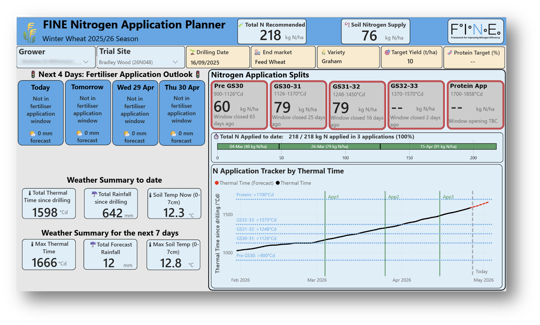
Step 5: Take a screenshot of the dashboard updated with metrics and graphs relating to your field (see the example below):
DataBaler (mobile)
Step 1: Open the DataBaler scout app
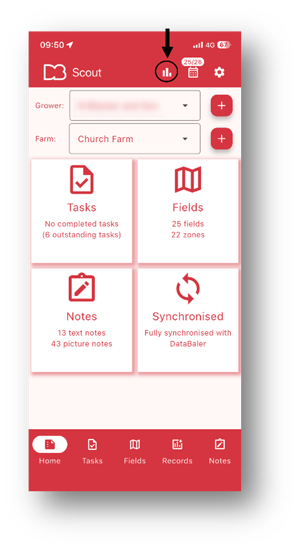
Step 2: Once logged in, tap the bar chart icon in the top-right of the screen (indicated in screenshot below)
Step 3: Tap the In-season 2026 icon.
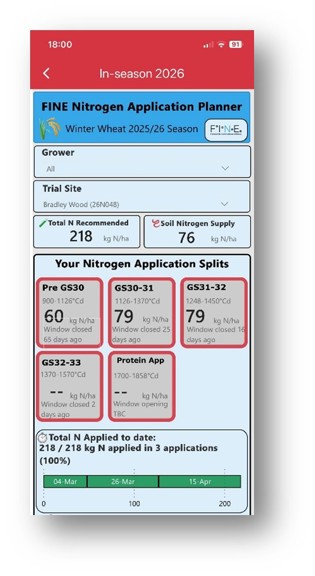
Step 4: In the dropdown selection boxes, select your farm under “Grower” and a field you have in the trials under “Trial Site”
Step 5: Take a screenshot of the dashboard updated with metrics and graphs relating to your field (see the example below):
How to Screenshot on a desktop:
- Windows: Press Windows + Shift + S, drag to select the area, and save the image.
- Mac: Press Command + Shift + 4, drag to select, and save the image.
Step 5: Share this screenshot with your Oxbury Relationship Manager.
If you have any questions or need help with screenshots, get in touch with the FINE team by contacting AgAnalyst (administrator@aganalyst.co.uk)